What replaced Stocky’s barcode label printing?
Stocky was retired on 31 August 2026. Purchase orders and receiving moved into Shopify admin, but printing barcode labels from what you had just received did not move with them as one connected workflow.
Nothing replaced Stocky’s label printing as a single feature. Shopify now handles purchase orders and receiving in the Shopify admin, while barcode-label printing remains a separate step.
So the workflow now splits in two: Shopify handles the receiving. Wirey Receive Labels handles the barcode labels for what was received.
What you can do natively, and where it stops
Receiving itself remains well covered in Shopify. The break happens between receiving the delivery and printing labels for those exact quantities.
Receiving
- Create a purchase order or transfer
- Receive the delivery
- Enter what actually arrived
- Record accepted quantity per line
Barcode labels
- Labels do not start from the receipt
- Received quantities do not automatically carry across
- Partial receipts are not translated into label counts
- Nothing records which units were already labelled
It picks up where receiving ends
Receive the stock in Shopify
Receive the purchase order or inventory transfer exactly as you normally would.
Open the receipt
Wirey Receive Labels reads the accepted quantities Shopify already recorded and fills in the label counts automatically.
Choose a format and download
Select Avery 5160, Dymo 30252 or Zebra 2¼″ × 1¼″ and generate the print-ready barcode-label PDF.
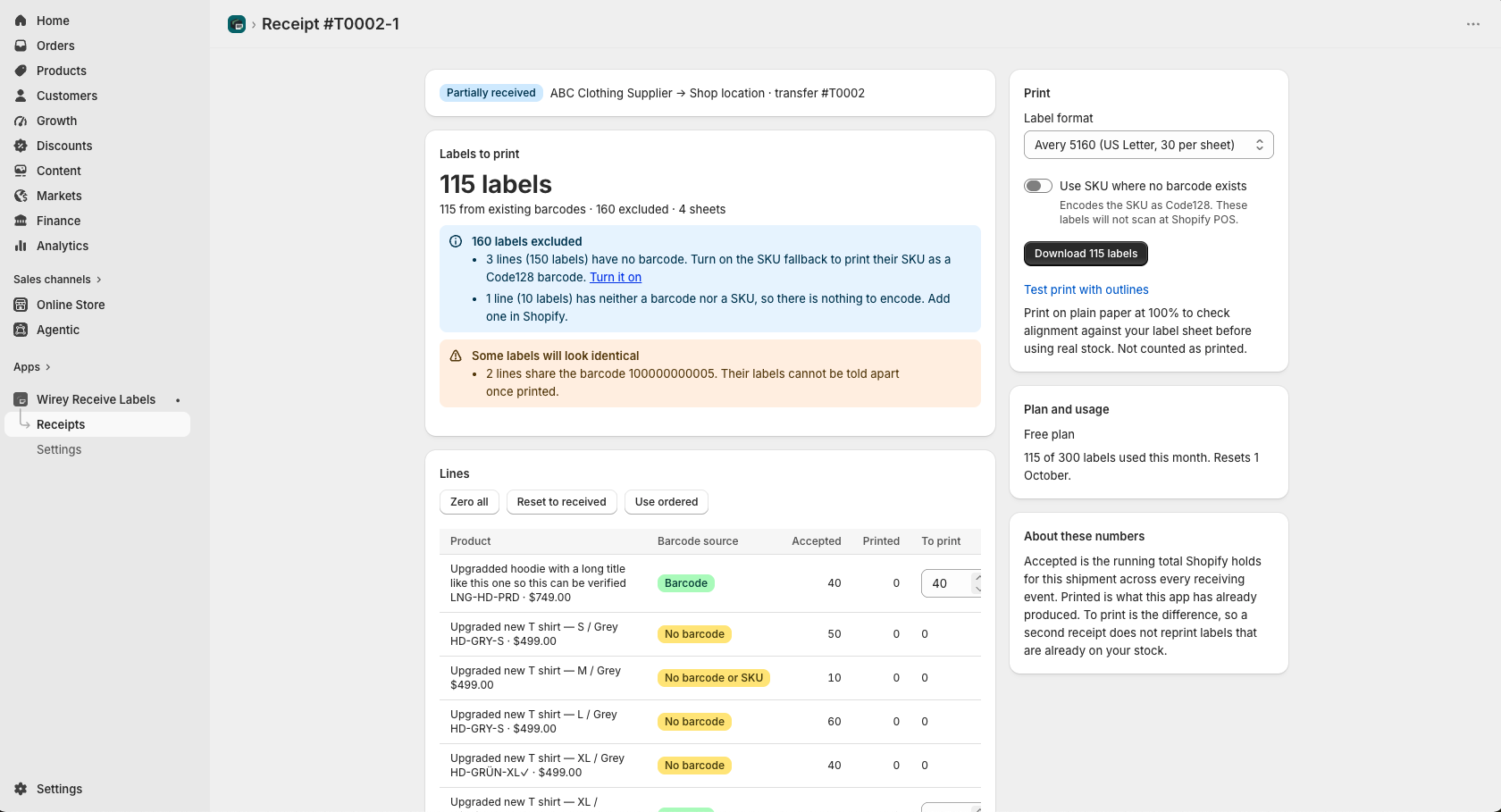
If you used Stocky for this, do this now
| In Stocky | Now |
|---|---|
| Create and manage purchase orders | Shopify admin → Products → Purchase orders |
| Receive against a PO and enter what arrived | Receive in Shopify; receiving creates a linked inventory transfer |
| Print barcode labels for the received quantities | Open the receipt in Wirey Receive Labels and download the PDF |
| Reprint after a second delivery | Reopen the receipt; only the newly accepted units are offered |
What this does not replace
Stocky did much more than print barcode labels. Wirey Receive Labels replaces one narrow workflow.
Not a purchase order manager
It does not create purchase orders, manage suppliers, or track purchase costs.
No forecasting
It does not analyse sales history or suggest reorder quantities.
No inventory changes
It does not add barcodes, change products, or adjust inventory.
No printer integration
It generates a PDF. You print it through your existing workflow.
This is not that.
Looking for the part that turns a received delivery into barcode labels without retyping quantities?That is exactly what Wirey Receive Labels is built for.
A note on barcodes that do not exist
Some variants have no barcode. Wirey Receive Labels will not invent one and write it to the Shopify product.
When a variant has no barcode but does have a SKU, you may optionally print that SKU as a Code128 barcode.
Shopify POS matches products using the Barcode field on the variant.
A SKU-derived Code128 barcode scans successfully, but it returns the SKU rather than the product barcode.
It is useful for internal picking or stock-taking, not for selling through Shopify POS.
Related receiving workflows
Frequently asked
When exactly was Stocky retired?
31 August 2026. Purchase orders and receiving moved into the Shopify admin; barcode label printing from a receipt did not move with them as one connected workflow.
Do I need to re-create my purchase orders?
No. Purchase orders and receiving now live in Shopify admin. Receiving creates a linked inventory transfer, which is what the app reads.
Can I still print labels for only the quantities I received?
Does it work for transfers between my own locations?
Yes. Any received transfer works. See printing labels from an inventory transfer .
Will it import my Stocky data?
No. Wirey Receive Labels reads live Shopify data only and does not import historical Stocky data.
Simple pricing
Enough to try the workflow on real incoming stock.
Unlimited labels.